
Low latency infrastructure is built by shortening the path between the data source and the compute that acts on it, then keeping that path stable under load. Bandwidth, faster switches and better software all help, but the largest single lever is physical distance. For organizations running real-time workloads in defense, healthcare, telecom, utilities, mining or GPU compute, that usually means placing compute at the edge, close to where data is created. A factory-built modular data center is the fastest way to put it there: SovereignOne’s containers go from site survey to live load in 4 to 6 months, compared with 2 to 5 years for a typical conventional build.
TL;DR
- Latency is a time measurement, in milliseconds or microseconds. Bandwidth is capacity. A faster link does not fix a long path.
- Delay comes from distance, transmission, queuing and processing, and the worst-case (tail) delay matters more than the average.
- Moving compute closer to the source is the most dependable way to cut latency. Edge data centers are the standard answer.
- Modular data centers let you place that compute on an existing grid connection, with no new substation and no interconnect queue.
- Pricing for SovereignOne units is quoted per project.
Table of Contents
- What low latency means, and why bandwidth does not fix it
- Where delay comes from
- Which workloads need it
- Design choices that reduce latency
- Why a modular data center is the practical route to the edge
- How to plan a low-latency deployment
- Where SovereignOne fits
- FAQ
- Sources
What low latency means, and why bandwidth does not fix it
Latency is the time a unit of data takes to travel from one point to another. Cloudflare gives a plain example: a packet leaving a New York server and arriving in London 145 milliseconds later has 145 ms of latency. It is a measure of time, not of how much data moves.
Bandwidth is the maximum capacity of a link. Throughput is what actually gets delivered. Kentik notes that high latency or packet loss can pull real throughput well below available bandwidth. The three metrics point to different fixes: more capacity, a better path, or a different design.
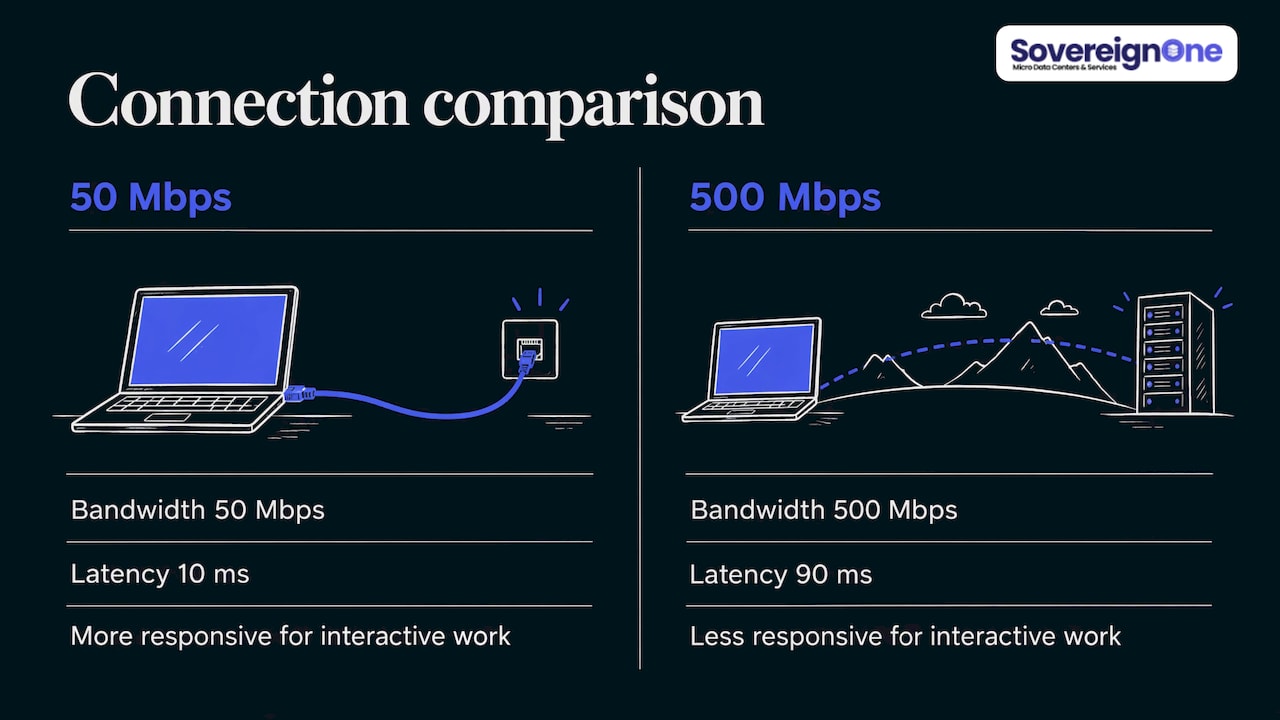
A useful comparison: a 50 Mbps connection with 10 ms latency feels more responsive for interactive work than a 500 Mbps connection with 90 ms. If your application is a control loop, a video analytics pipeline or an inference service, responsiveness is what you are buying.
Azion’s explainer puts typical broadband latency at 10 to 50 ms to nearby servers and 100 to 300 ms to servers on other continents, with delays above 100 ms noticeable in interactive applications.
Where delay comes from
Total latency is the sum of several parts. The open textbook Computer Networks: A Systems Approach breaks it into propagation, transmit and queue time. Propagation is distance divided by the speed of light in the medium, about 2.0×10⁸ meters per second in optical fiber. Transmit time is packet size divided by bandwidth. Queue time is the wait inside switches and routers.
This breakdown explains why money spent on bandwidth only shrinks one component. Propagation is fixed by geography. You cannot upgrade your way past the speed of light, you can only move the endpoints closer together.
First requests carry extra setup cost too. MDN describes the DNS lookup, TCP handshake and TLS negotiation that happen before any content moves. Each is a round trip, so each one is multiplied by distance.
Jitter and tail latency
Average latency hides the problems users notice. Jitter is how much latency varies from packet to packet. Red Hat points out that too much jitter makes a network unreliable even when the average looks good.
The same logic applies to servers. In Microsoft’s Catapult research, the authors note that user experience is dictated more by tail latencies, the 95th, 99th and 99.9th percentiles, than by averages. When you specify infrastructure, ask for percentile targets, not a single average figure.
Delay inside the data center
Distance is not the only cause. A 2025 NSDI study by Google researchers found that hotspots at top-of-rack switches can persist for hours and degrade the end-to-end latency of some distributed applications by more than 2×. Placing tasks and data with available bandwidth in mind cut p95 network latency by more than 50%. Inside the rack, topology and workload placement matter as well.
To see where your own delay sits, measure it from the application’s point of view. Microsoft’s Pingmesh places a lightweight agent on every server for exactly that reason.
Which workloads need it
Not every workload justifies a purpose-built low-latency design. These do:
- Grid and utility control. The U.S. Department of Energy’s SPARC latency whitepaper states that low latency is critical for real-time control of grid assets, and essential for protective relays, where the longer a line carries power during a fault, the more damage is done.
- Manufacturing and mining. OVHcloud reports that requirements for mission-critical manufacturing are often 10 ms or below, so automated guided vehicles can operate safely.
- Healthcare. The same white paper notes delays can affect patient outcomes in critical care and remote surgery.
- Telecom and 5G. Ultra-reliable low-latency communications depend on bringing the network core close to the edge.
- AI and GPU compute. IBM notes that agentic AI systems depend heavily on low data latency, because delay reduces the accuracy of autonomous actions.
- Trading. Firms locate operations as close to the exchange as possible to cut distance-based delay. The principle is the same one that applies to every other workload on this list.
Design choices that reduce latency
1. Shorten the path
The TIA-942-C white paper says edge computing reduces latency by storing and processing data in smaller, decentralized data centers closer to the source. It also says real-time applications need millisecond network functionality that centralized cloud facilities hundreds of miles away cannot deliver. Edge sites it describes range from street-corner enclosures to dozens of racks in a regional central office.
A July 2026 industry report on edge data centers cites latency reductions of 40 to 80% depending on location, and notes that local processing continues through network disruptions and eases data-residency requirements. For more on the model, see our guide to edge data centers and how to deploy one.
2. Match the topology to the traffic
Inside the facility, the Cerberus paper argues for matching traffic types to topology types: latency-sensitive flows on a static topology, bulk flows on others, instead of one design for everything. In practice, keep latency-critical traffic on short, dedicated, uncongested paths.
3. Keep power and cooling from becoming the constraint
Edge sites are often where grid capacity is thin. ITU-T Recommendation L.1306 on edge data centre infrastructure covers edge sites built for low-latency processing and recommends modular UPS systems, lithium-ion battery storage and cooling options designed to improve PUE (power usage effectiveness, the ratio of total facility power to IT power). A design that fits the power you already have is part of a low-latency plan, because a site you cannot energize cannot serve anyone.
4. Secure the edge from the start
Distributed sites widen the attack surface. Plan controls, standards and physical site design together; our guide to secure edge computing covers them.
Why a modular data center is the practical route to the edge
The usual obstacle to edge placement is time. A conventional build can take 2 to 5 years, and new power infrastructure can add an interconnect queue on top. A modular data center (MDC) is a factory-integrated, pre-tested unit delivered as a finished container, like a shipping container that arrives with racks, power distribution and cooling already inside.
SovereignOne’s units are designed around that problem:
- Speed. Site survey to live load in 4 to 6 months.
- Existing power. Units deploy on an existing grid connection with no new substation and no interconnect queue.
- Efficiency. The cooling design cuts power and water use for cooling by 30%.
- Familiar equipment. Units use established vendor hardware, so your own team can maintain and operate them without learning a new platform.
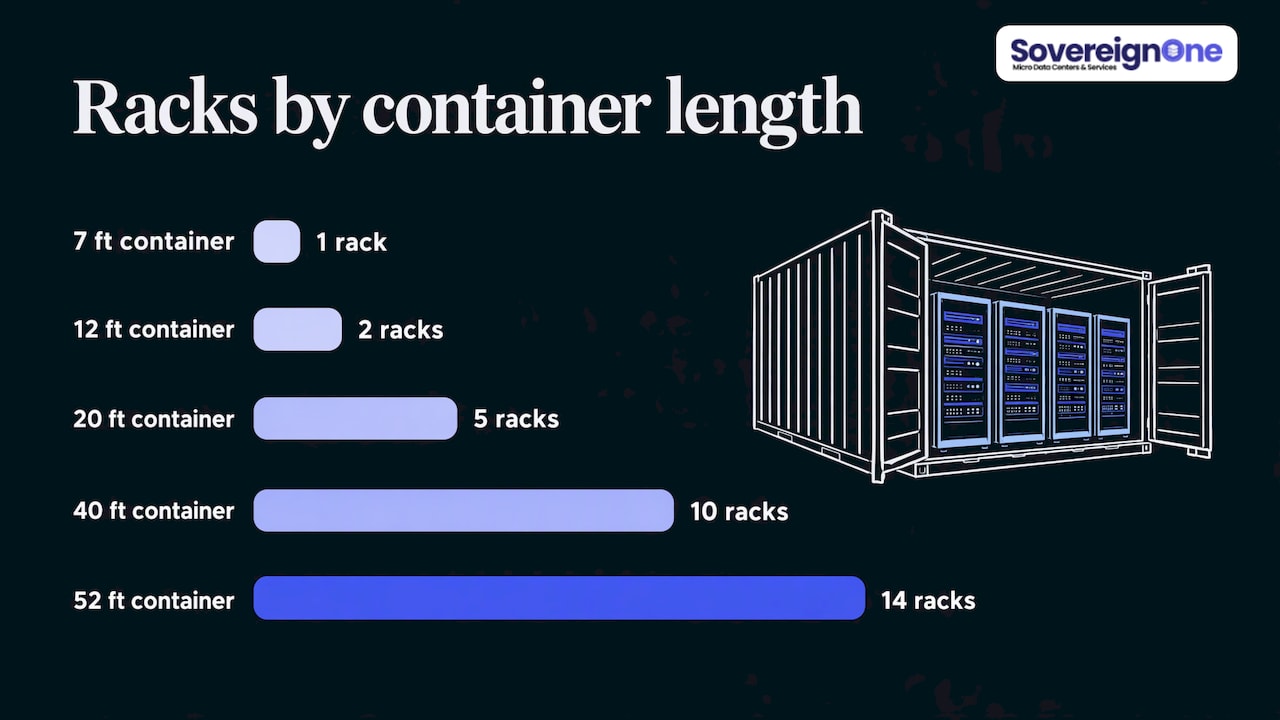
- Sizing. Five container lengths on one platform, at a nominal 125 kW per rack.
| Container | Racks | Power |
|---|---|---|
| 7 ft | 1 | 125 kW |
| 12 ft | 2 | 250 kW |
| 20 ft | 5 | 625 kW |
| 40 ft | 10 | 1.25 MW |
| 52 ft | 14 | 1.75 MW |
Because units are small and repeatable, you can place several near different data sources, such as a hospital campus, a mine site, a cell aggregation point or a municipal operations center, rather than routing everything to one distant facility. To size the first deployment, use our data center capacity planning guide.
How to plan a low-latency deployment
- Set a latency budget per application. State the target in milliseconds at the 99th percentile, not just the average.
- Map where data is created. Sensors, users, radios and instruments define where compute should sit.
- Measure the current path. Record round-trip time, jitter and packet loss from the application side.
- Check available power at candidate sites. Existing grid capacity decides whether a site is viable quickly.
- Size the unit. Start from kilowatts per rack and rack count. GPU and AI loads drive density.
- Plan security and commissioning. Both shape the schedule. See our notes on data center commissioning.
- Agree on pricing early. Cost depends on the project, so build the quote around your latency and power requirements. Our list of questions worth asking in a quote helps.
Where SovereignOne fits
SovereignOne is a modular data center company based in Tampa, Florida, and part of Liberation Technology Services, a WEXMAC prime contract holder operating since 2021. Our units serve defense, state and local government, healthcare, telecommunications, education, smart cities, sovereign cloud, disaster response, manufacturing, agriculture, transportation and logistics, mining, and oil and gas. We also offer GPU edge facilities for AI compute close to the data.
If you have a latency target and a site, the modular data center containers page shows the full lineup. Pricing is quoted per project.
For sector detail, see our pages on telecom edge data centers and smart city data centers.
FAQ
Is low latency good or bad?
Low latency is good: it means a short delay between an action and a response. Twilio defines it as a delay short enough that users do not notice it. High latency is the problem to design out.
Is it better to have high or low bandwidth?
They solve different problems. Bandwidth sets how much data can move at once, and latency sets how long each piece takes. For responsive, real-time applications, low latency matters more once you have adequate bandwidth, since a fast link cannot fix a long path.
How close does compute need to be?
It depends on the application’s budget. Manufacturing control can need 10 ms or below, while many interactive services tolerate far more. Work backward from your budget and measure the real path before choosing a site.
How fast can an edge data center go live?
For SovereignOne modular units, the timeline is 4 to 6 months from site survey to live load, compared with 2 to 5 years for a typical conventional build.
Sources
- What Is Latency? | Cloudflare
- Latency vs Throughput vs Bandwidth | Kentik
- What Is Latency? Ping, Jitter, and Bandwidth Explained | TP-Link
- What is Latency? | Azion
- Performance, Computer Networks: A Systems Approach
- Understanding latency | MDN
- What is a latency-sensitive application? | Red Hat
- A Reconfigurable Fabric for Accelerating Large-Scale Datacenter Services
- Preventing Network Bottlenecks (NSDI 2025)
- Pingmesh (SIGCOMM 2015)
- SPARC Series Latency Whitepaper | U.S. Department of Energy
- Transform Business Performance with Ultra-Low Latency | OVHcloud
- Near Zero Latency with 5G | T-Mobile for Business
- What Is Data Latency? | IBM
- What Is Low Latency? | Cisco
- TIA-942-C Data Center Infrastructure
- Edge Data Centers Are Reshaping Low-Latency Digital Infrastructure | Data Center POST
- Cerberus: The Power of Choices in Datacenter Topology Design
- Recommendation ITU-T L.1306
- Understanding Latency | Twilio
- Latency | Fusion Connect