
Hybrid cloud infrastructure combines at least one private environment, usually your own on-site or hosted capacity, with at least one public cloud, and links them so workloads and data can move between them. The public side is available in minutes. The on-site side is the slow part, because a traditional data center build can take 2 to 5 years from permitting to activation. A factory-built modular data center changes that timeline: our units can go live within 4 to 6 months, on your existing power grid, which is why they are a practical way to build the local layer of a hybrid design.
This guide is for IT and facilities leaders who must put compute near the data, under their own control, without waiting years. It explains the architecture, how the layers connect, where the edge fits, what to assess before you commit, and how to keep power use in check.
TL;DR
- Hybrid cloud is a private layer plus a public layer, bound by technology that lets data and applications move between them.
- The connection between the layers decides whether you have a hybrid cloud or just two separate environments running in parallel.
- Local capacity gives you lower latency, control over where data lives, and operation that continues if the wide-area link drops.
- Modular data centers shorten the build of that local layer from years to 4 to 6 months, scalable from 1 to 14 racks per unit.
- Cooling is a large share of a data center’s energy bill, so cooling design is a power decision from day one.
Table of Contents
- What hybrid cloud infrastructure actually is
- How the layers connect and where it breaks
- Why the local layer matters
- The bottleneck: building the private layer
- Putting it into practice with SovereignOne
- What to assess before you deploy
- Power and cooling: the cost that compounds
- A worked example
- Choosing the right shape for your organization
- FAQ
- Sources
What hybrid cloud infrastructure actually is
The U.S. Department of Energy’s Cloud Smart guide describes hybrid cloud as a combination of distinct cloud infrastructures that remain unique entities but are bound together by standardized or proprietary technology that enables data and application portability. The same guide says hybrid deployment suits periods of cloud transformation, when some workloads sit in the public cloud while others stay on premises and depend on each other.
In plain terms, you keep some systems where you control the hardware, you rent others from a public provider, and you make the two behave as one environment.
Hybrid cloud, multicloud and hybrid IT
These terms get mixed up, and the difference matters when you write requirements.
- Hybrid cloud: interconnected public and private clouds sharing data and processes to do the same task.
- Multicloud: services from more than one public cloud, used for different tasks wherever they are hosted. A multicloud setup can include a hybrid one, but a hybrid cloud is not automatically multicloud.
- Hybrid IT: the wider habit of mixing on-premises systems with cloud services, whether or not they are integrated into one managed environment.
If your organization needs to keep certain data in a building you control, you are designing a hybrid cloud, and the private layer is yours to specify.
How the layers connect and where it breaks
A hybrid cloud works only when the clouds are really connected. Without a working link, an organization is simply running two or more separate cloud environments in parallel and does not get the benefits of a hybrid design. The usual connections are APIs, VPNs and wide-area networks.
IBM describes three patterns for exchanging data between the layers:
| Pattern | Latency | Security | Cost |
|---|---|---|---|
| Public IP addresses over the internet | Higher, shared bandwidth | Lowest of the three | Lowest |
| Managed VPN service | More predictable | Higher | Moderate |
| Dedicated interconnect at a common point of presence | Lowest | Highest | Highest, expensive |
Most deployments start with a VPN and move to dedicated interconnect for the traffic that cannot tolerate delay. A local private layer reduces how much traffic needs the expensive path in the first place, because the data is processed where it is created.
Management is the other half
Red Hat’s 2021 guide notes that managing across distributed environments remains a significant challenge and that Linux, Linux containers and Kubernetes act as a common abstraction layer across them. It adds that the original notion of unconstrained portability was never realistic for most organizations. The practical lesson: choose private-layer hardware and software your team already knows, so one set of skills and tools covers both sides. Our modular data centers are integrated from established hardware platforms and use familiar vendor equipment, so your team can maintain and operate them without learning a new platform.
Why the local layer matters
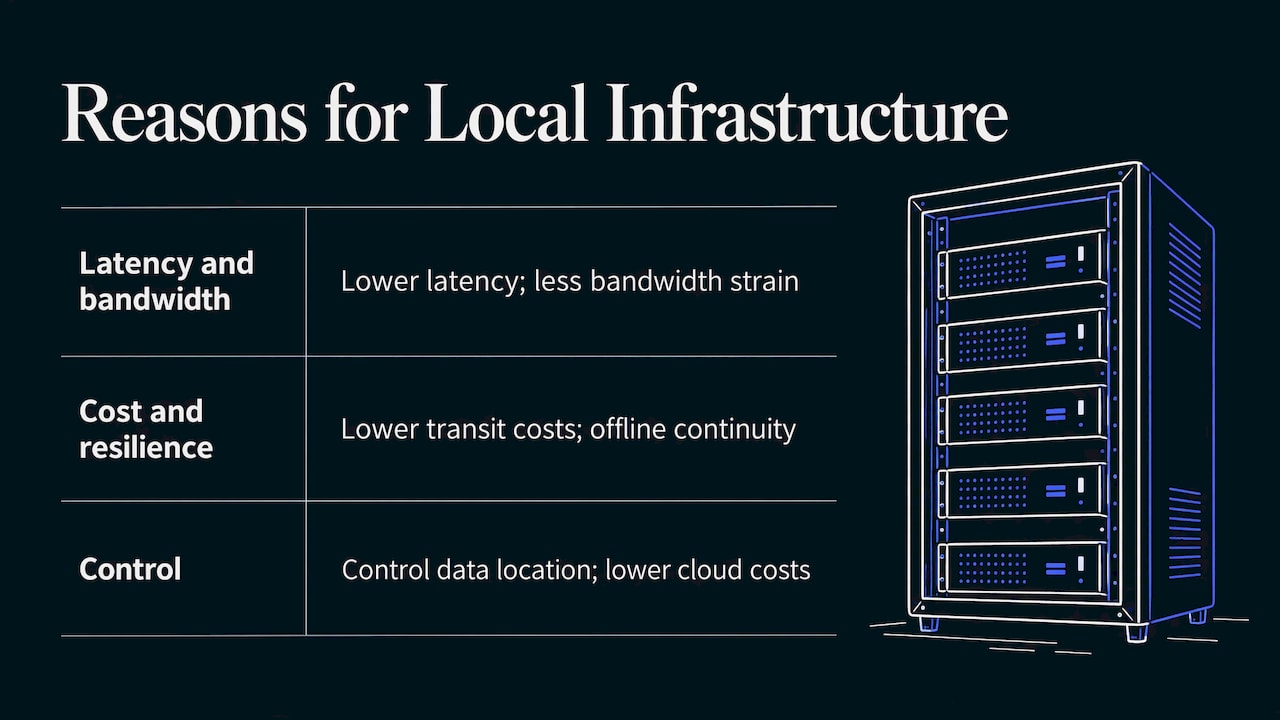
The phrase “localized cloud infrastructure” describes putting compute closer to users, data sources or operations. Three reasons drive it.
Latency and bandwidth. The OpenStack Foundation says the defining need behind edge computing is service delivery closer to users or end-point data sources, with lower latency for responsive remote desktops and AR, and relief from bandwidth limits for IoT and network-function workloads.
Cost and resilience. Deloitte notes that reducing the distance between where data is captured and processed reduces internet traffic and transit costs, improves latency and bandwidth use, and lets edge operations continue when the wide-area connection is lost, without losing data consistency.
Control. Data Center Knowledge reports that hybrid clouds give more control over where data lives and can save money for organizations facing runaway public cloud costs, and that they perform better when edge infrastructure puts workloads close to end users.
These map directly to the industries we serve: defense sites that cannot send data off premises, hospitals that need immediate processing, smart-city sensors producing more data than is worth hauling to a distant region, telecom nodes, universities, and disaster recovery sites that must work when the network does not.
The bottleneck: building the private layer
On paper, the private layer is a decision. In practice it is a construction project. A conventional build means site design, permits, new power feeds, cooling plant, and commissioning, which is where the 2 to 5 years go. Meanwhile your public cloud workloads keep growing and your costs keep rising.
Prefabricated modular data centers attack that schedule. Businesskorea reported in September 2026 that prefabricated units can cut AI data center construction from the typical two years to six months or less, so capacity can start working before hardware ages out. That is the logic of our approach: the systems are built, integrated and tested in a factory, then delivered as a finished unit.
What that means in practice for a hybrid design:
- Time to production: units can go live within 4 to 6 months.
- No new utility build: units deploy on existing power grids, without new infrastructure.
- Right size: each unit scales from 1 to 14 racks, so you can place one near each site that needs local compute and add units as demand grows.
- Familiar operations: the equipment comes from established hardware platforms, so existing teams run it.
Putting it into practice with SovereignOne
If your hybrid plan needs a private or edge layer on site within months, our Modular Data Center Containers are built for that job. They arrive as finished, factory-tested units with advanced liquid and hybrid cooling, designed to cut power and water consumption by 30%, and they fit edge compute, disaster recovery, education, smart city, telecom, government and hyperscale workloads.
For GPU-heavy workloads placed near the data, see our GPU Edge Facilities. You can also start from our main site to see how units are specified for your sector, and talk to us about the site, the rack count and the connection back to your public cloud.
What to assess before you deploy
A reliable planning frame is the five-pillar view of hybrid best practice: networking, security, resiliency, capacity planning and infrastructure management. Use it as a checklist for the private layer.
1. Networking
Decide which traffic goes over a VPN and which needs dedicated interconnect, using the table above. Measure the latency your slowest application can tolerate, then place the local unit so that path stays short. Plan for the case where the wide-area link fails: the local layer should keep serving users.
2. Security and data location
List the datasets that must stay on site because of regulation, contract or mission. Those define the minimum size of the private layer. Keep identity, encryption and access policy consistent across both sides so there is one standard, not two.
3. Resiliency
Decide what happens to each workload if the on-site unit, the public region or the network goes down. Disaster recovery is a natural use for a deployable unit, because you can position it away from the primary site.
4. Capacity planning
Size the first unit for known workloads, and use public cloud for unpredictable bursts. IBM describes this as cloud bursting, where public resources scale up quickly for unplanned spikes without affecting private workloads. Because units scale from 1 to 14 racks, you can add capacity in steps rather than overbuilding up front.
5. Infrastructure management
Pick tooling that covers both layers and matches your team’s skills. The fewer new platforms to learn, the faster the unit moves from delivery to production.
Power and cooling: the cost that compounds
A private layer adds to your own energy bill, so design it with efficiency in mind. Dell’Oro Group reports that thermal management consumes 30 to 40 percent of a data center’s annual energy, second only to compute. The same report says liquid cooling, including direct liquid cooling that captures about 80% of server heat and immersion cooling that captures nearly 100%, can push power usage effectiveness (PUE, the ratio of total facility power to IT power) as low as 1.03.
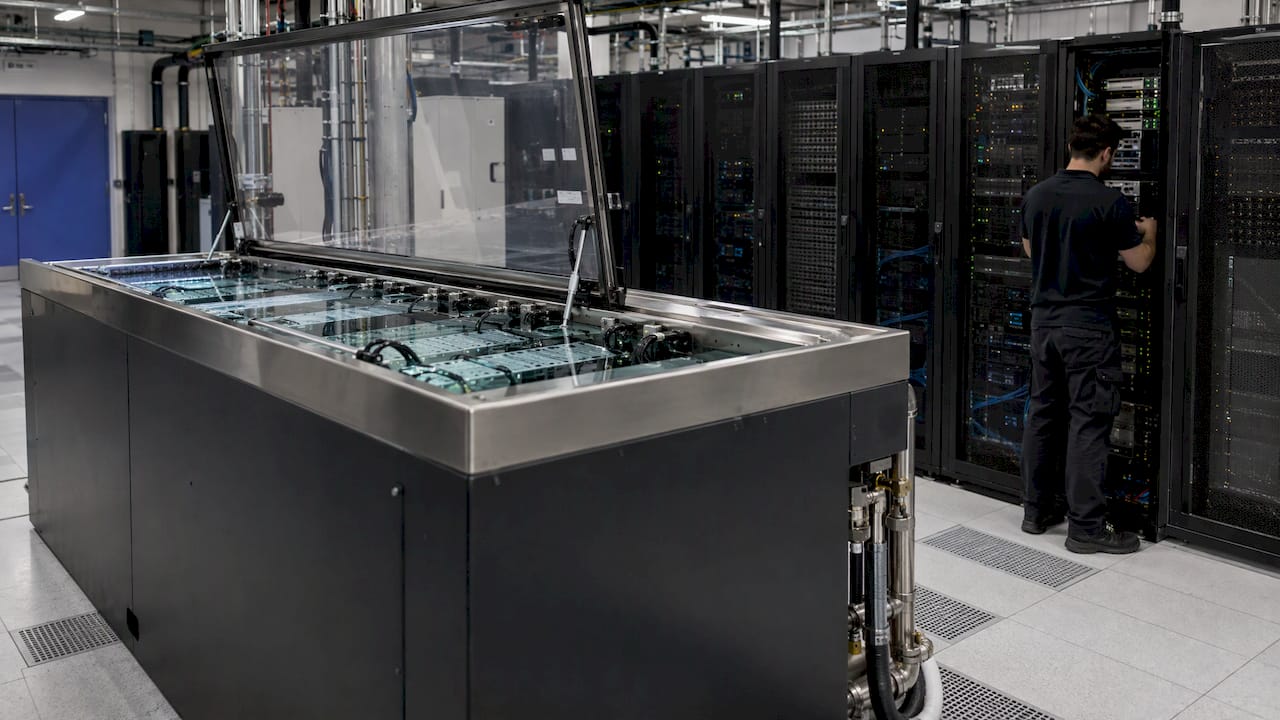
This is why we build advanced liquid and hybrid cooling into every unit: it targets the largest controllable overhead. Our design aims for a 30% reduction in power and water consumption compared with conventional approaches.
Placement of workloads matters too. Academic modeling of hybrid edge-cloud systems found energy savings of up to 75% and cost reductions above 80% in resource-intensive scenarios, and for traditional workloads with an 80% edge split, annual per-device cost fell from $263 to $66. Those are modeled results, not a promise for any one site, but they show the direction: processing near the source cuts both energy and transit.
A practical way to apply this:
- Inventory workloads and tag each as latency-sensitive, data-resident or elastic.
- Put latency-sensitive and data-resident workloads in the local unit.
- Leave elastic and bursty workloads in the public cloud.
- Review the split every quarter as usage and costs change.
A worked example
Imagine a county government running a smart-city program with traffic cameras and sensors across several districts. Sending all video to a distant region adds transit cost and delay, and a network outage would blind the operations center.
A hybrid design puts one unit of a few racks in the district hub. Video is analyzed there, only events and summaries go to the public cloud for long-term storage and analytics, and the hub keeps running if the link drops. The public cloud still handles reporting and seasonal peaks. Because the unit deploys on the existing grid and is delivered finished, the program starts in months, not after a multi-year construction process.
Choosing the right shape for your organization
- One site, one critical workload: a single unit with a managed VPN back to the public cloud.
- Several sites with local data: one unit per site, each sized from 1 to 14 racks, managed under a single toolset.
- Regulated or sensitive data: a unit on your premises holds the regulated datasets, with the public cloud used for everything that is not restricted.
- Disaster recovery: a unit at a secondary location, ready to take over critical services.
FAQ
What is the difference between hybrid cloud and private cloud?
A private cloud is a single environment dedicated to your organization. A hybrid cloud connects that private environment to at least one public cloud so data and applications can move between them. The connection and shared management are what make it hybrid.
How long does it take to build the private side of a hybrid cloud?
A traditional data center build can take 2 to 5 years from permitting to activation. Our modular units can go live within 4 to 6 months because they are factory-built, integrated and tested before delivery.
Do I need new power infrastructure for an on-site unit?
Our modular data centers deploy on existing power grids and remove the need for new infrastructure. Your site team should confirm the available capacity for the number of racks you plan, from 1 to 14 per unit.
When does localized infrastructure make sense?
It makes sense when latency, bandwidth cost, data residency or continuity during network outages matter. Defense, healthcare, smart cities, telecom and disaster response are typical examples, because the data is created far from a central cloud region.
How does cooling affect hybrid cloud costs?
Thermal management takes 30 to 40 percent of a data center’s annual energy, so it is a major lever. Liquid and hybrid cooling reduce that load, and our units are designed to cut power and water use by 30%.
Sources
- DOE Cloud Smart Reference Guide
- What Is Hybrid Cloud? Benefits and Networking, Google Cloud
- What is hybrid cloud? Cloudflare Learning Center
- How to Design a Hybrid Cloud Architecture, IBM
- What Is Hybrid Cloud Architecture? IBM
- Hybrid cloud and Kubernetes, Red Hat
- Cloud Edge Computing: Beyond the Data Center, OpenStack
- Intelligent edge network, Deloitte Insights
- How Hybrid Cloud Is Redefining the Role of the Data Center, Data Center Knowledge
- Modular AI Data Centers Cut Construction Time to Six Months, Businesskorea
- Achieving Sustainable Data Center Growth, Dell’Oro Group
- Quantifying Energy and Cost Benefits of Hybrid Edge Cloud, arXiv